✨ Talk to Santa Live! — Your Magical Moment Awaits
Talk to Santa lets children have a real-time, two-way conversation with Santa Claus himself! ✨ Your child can enjoy up to 10 personalized exchanges with Santa, filled with laughter, wishes and Christmas spirit. Each conversation is unique and can only be launched once.
Step 1: Choose an experience
Click Talk in the top menu of the website (in the app, it's at the bottom of the screen). Choose an experience, for example Talk to Santa – Parent & Child, Groups or Ask Your Questions, then click Personalize. Each experience shows how many credits it needs (for example 3 credits for Parent & Child) and your balance.
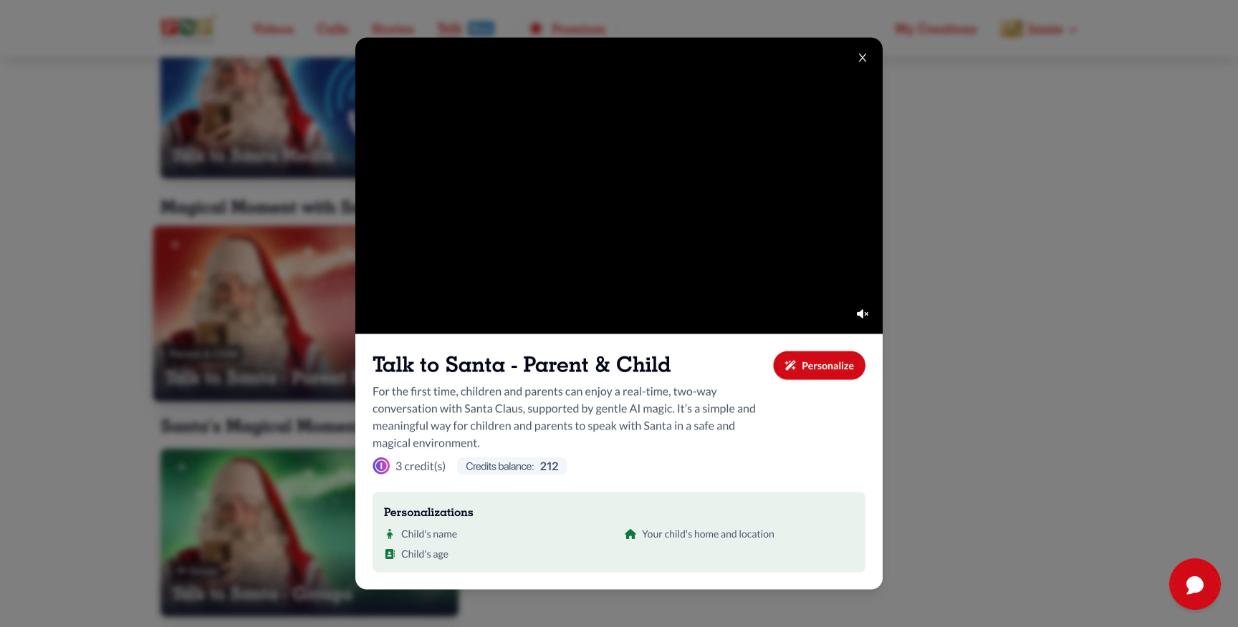
Step 2: Personalize
- Santa will speak in: choose English, French, Spanish, Italian, German or Polish.
- Select recipient: pick the child, or click New recipient.
- Details: child's name, boy or girl, age, and where they live (country, state/province and city).
Step 3: Confirm
Before continuing, confirm that:
✅ An adult will be present to help the child enjoy the conversation.
✅ You agree that the information may be shared with OpenAI to create the personalized experience.
✅ You accept the Terms of Use, Terms of Sale and Privacy Policy.
Click Create Conversation. The credits are charged at this step.
Step 4: Get ready
🔊 Turn up the volume, 🤫 reduce background noise and 👨👩👧 avoid several people talking at once. Click Start conversation and allow microphone access so Santa can hear you (see How to set up your microphone permissions).
Step 5: Enjoy the magic 🎄
Santa appears on screen. You'll see a timer and a counter of magical exchanges (for example 3/10).
Step 6: End of the conversation
When the exchanges are done, a Keep the magic safe screen asks a small math question for the grown-up. Answer it and click Submit.
Step 7: Share your feedback
Rate the experience from 1 to 5 stars, add a comment if you like, and click Send feedback.
Good to know: each conversation can only be launched once, and you can create separate conversations for each child. Make sure your internet connection and microphone work well. Your conversations are saved in My Creations > Talk.