How to Request a New Name or Pronunciation (Instantly!)
Great news! If Santa doesn’t recognize your child’s name, you can now add the name yourself instantly — no waiting, no email delays. This feature is exclusive to Magic Pass and Magic Pass+ holders.
Here’s how to easily request and use a new name or pronunciation.
🎄 Before you begin
Make sure:
-
You’re logged into your PNP account, and
-
You have an active Magic Pass or Magic Pass+ (required for name requests).
⭐ Step-by-Step: Add a New Name Instantly
You can request a new name while personalizing any Premium content, such as:
-
Videos
-
Video calls
-
Phone calls
-
Stories
-
Our newest feature: Talk to Santa
1. Type the child’s name
When the personalization form appears, enter the child’s first name as usual. If Santa recognizes it, you will see the pronunciation right away. If not, you’ll see a message like:
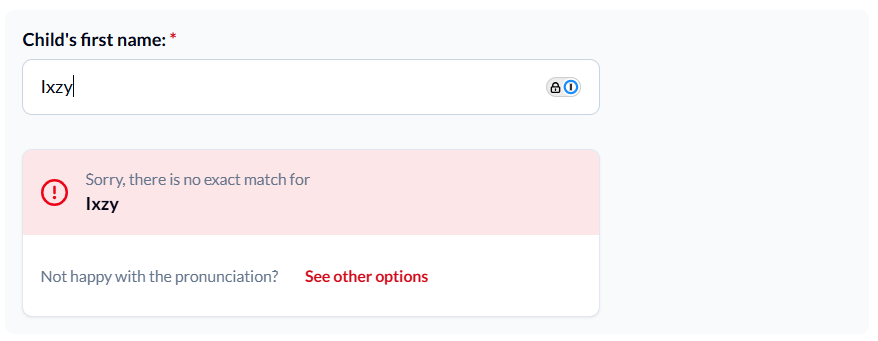
This simply means we need to generate new options for you.
2. Santa will generate pronunciation options
We’ll automatically create several natural-sounding ways Santa could say the name.
This may take a few seconds.
3. Choose the pronunciation you prefer
A list of pronunciation options will appear.
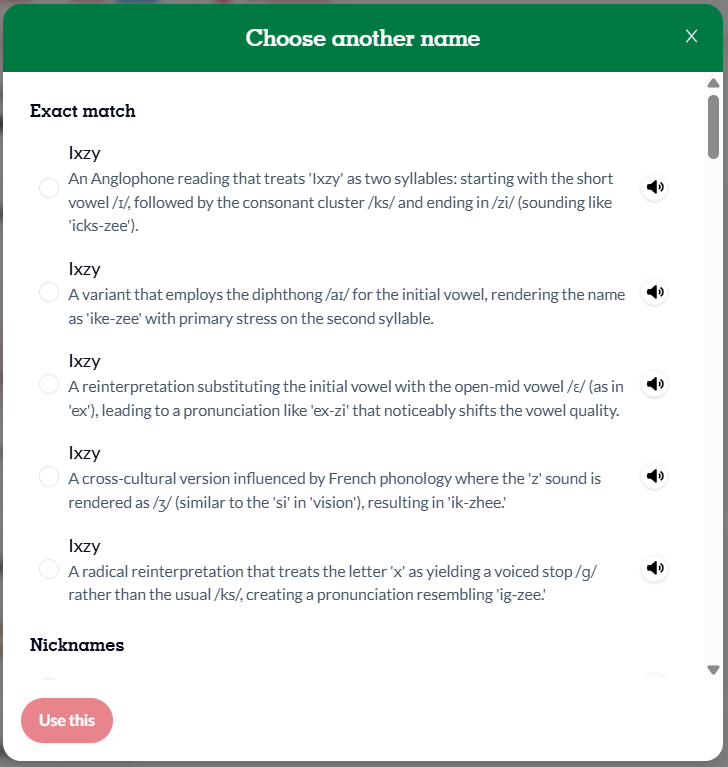
For each one, you can:
-
Tap the speaker icon to hear how Santa will say it
-
Read the short description below each option
-
Select the one that matches the child’s name best
-
Press Use this to confirm
No recording needed — it’s all automatic!
4. Continue creating your magical content
Once you choose the pronunciation:
-
The selected name will appear in the form
-
You can continue filling out the remaining fields
-
Then create your video, call, story, or Santa conversation as usual!
That’s it! The name is now instantly available for your creation.
💡 A gentle reminder about names
To keep PNP magical, safe, and family-friendly, please keep in mind:
-
✅ Only first names or nicknames can be added
-
✅ The feature is designed for real names used by children
-
❌ Names containing vulgar, offensive, hateful, or inappropriate language will not be generated or made available
This helps ensure Santa always speaks with kindness and respect — for every child, every family, and every moment of magic.