How do I delete my PNP account? (Permanent data deletion)
If you want to close your PNP account permanently, this is the guide to follow.
⚠️ This is about deleting your PNP account and all your personal data (videos, calls, stories, recipients). It can't be undone. It does not cancel an App Store or Google Play subscription.
- Only want to delete one video or call? See How do I delete my Santa Video or Santa Call?
- Only want to stop the renewal? See How do I cancel my subscription?
On the website
- Log in and click your name at the top right.
- Select My account.
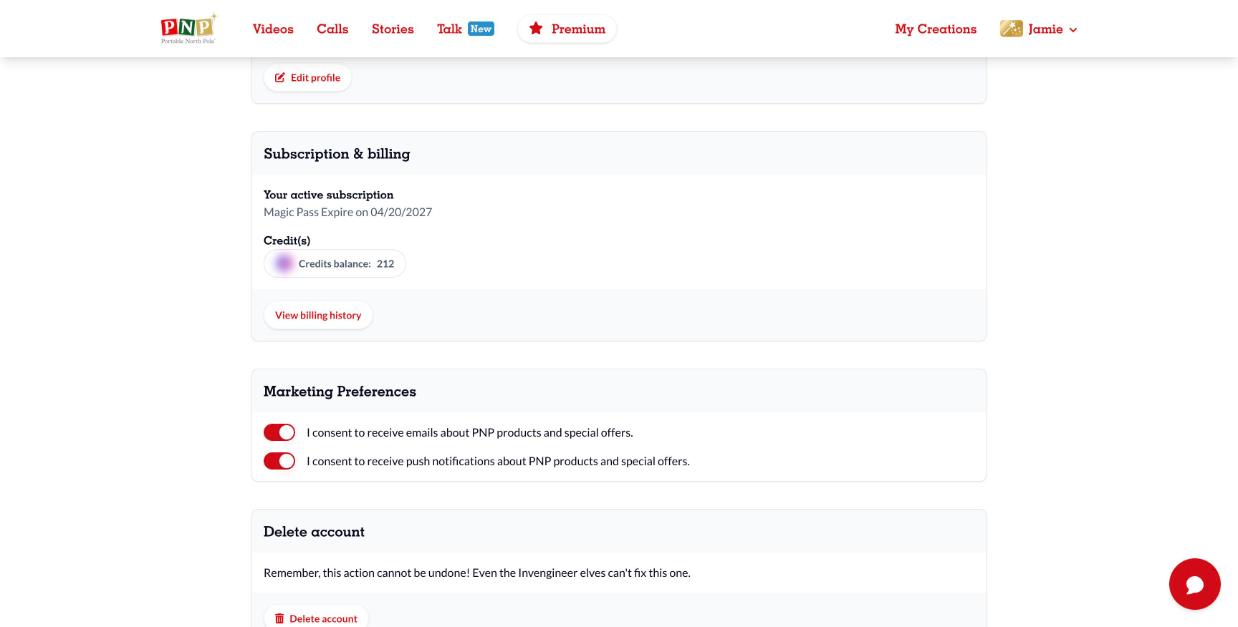
- Scroll down to Delete account and click Delete account.
- Confirm to permanently delete your account and data.
In the app
- Open the app, sign in and tap the profile icon at the top right.
- Tap your name and email in the User Session section.
- Scroll down, tap Delete account and confirm.
Can't access your account anymore? Use the chat bubble on the website or our support request form, and include the account email and a receipt as proof of ownership if you made purchases.